
How to Find Your Manhattan SCALE Database Connection Information
If you're a consultant or system administrator working in a Manhattan SCALE environment, you'll probably need to identify where the system's databases live. Whether you're onboarding to a new client environment or troubleshooting a production issue, knowing the server and database names is foundational. SCALE uses two separate databases, and depending on the version, there are two different ways to access the connection information.
Method 1: Use the SCALE Toolbox Utility (Older Versions)
If you're running an older version of Manhattan SCALE, such as SCALE 2019, you can use a utility built into the SCALE Toolbox called Encrypt Database Connection.
Follow these steps to retrieve the connection details for both databases:
- Connect to the SCALE application server.
- Launch the SCALE Toolbox.
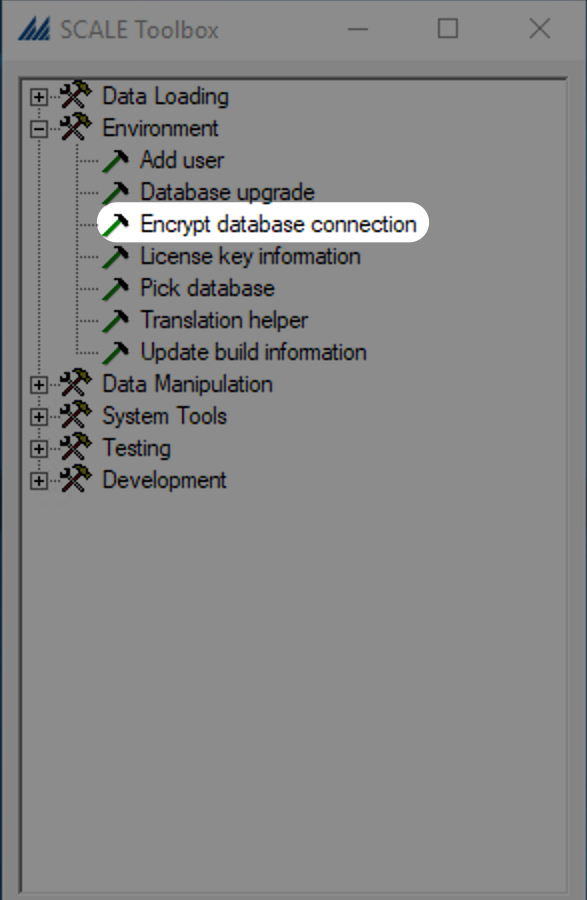
- In the left-hand navigation, expand Environment, then click Encrypt database connection.
- In the Encrypt Database Connection window, select either ILS Database or ILS System Database, then click Get Connection String.
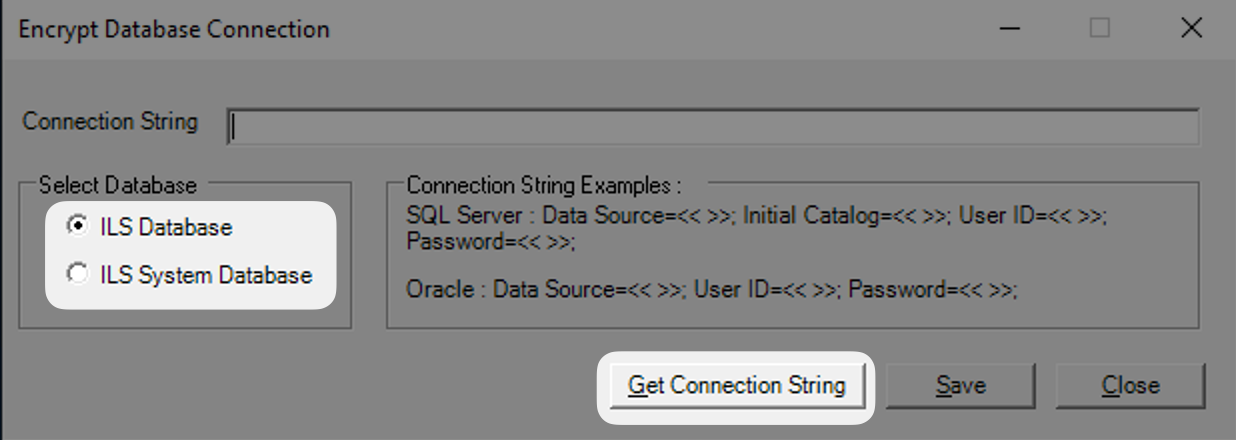
This will return the entire decrypted connection string for the selected database, including:
- SQL Server name
- Database name
- SQL username
- SQL password
Method 2: Use PowerShell (Newer Versions)
If you're working in a newer version of Manhattan SCALE (ex: SCALE 2023 or later), the Toolbox utility is no longer available. Instead, SCALE provides a built-in PowerShell command to retrieve connection details.
From the SCALE application server, open PowerShell and run the following command:
Get-ScaleDefaultDB -Showall
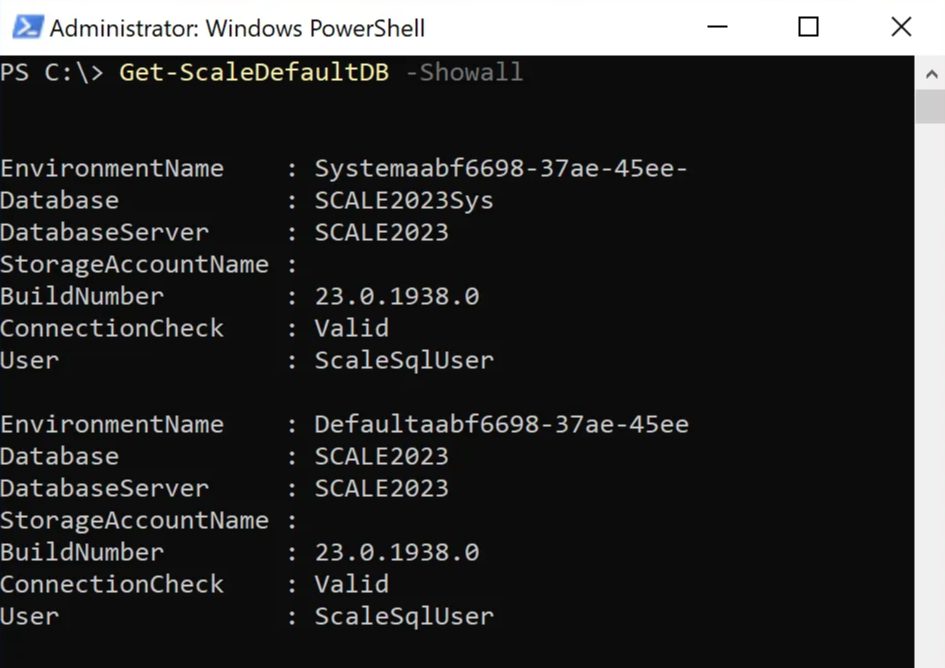
This will return details for both SCALE and System databases, including:
- SQL Server name
- Database name
- SQL user
- Build number
- Connection status
Sample output:
EnvironmentName    : Systemaabf6698-37ae-45ee
Database           : SCALE2023Sys
DatabaseServer     : SCALE2023
StorageAccountName :
BuildNumber        : 23.0.1938.0
ConnectionCheck    : Valid
User               : ScaleSqlUser

EnvironmentName    : Defaultaabf6698-37ae-45ee
Database           : SCALE2023
DatabaseServer     : SCALE2023
StorageAccountName :
BuildNumber        : 23.0.1938.0
ConnectionCheck    : Valid
User               : ScaleSqlUser
Note that the password is not included in this output, which is a win from a security standpoint.
Unsure Which Method to Use?
- If the Toolbox utility is present, use that. If not, try the PowerShell method.
- The transition happened sometime between SCALE 2019 and 2023, but it's not clearly called out in release notes.
Wrapping Up
Whether you're stepping into a new client environment or need to validate connection information for troubleshooting quickly, these tools make it easy to surface the core database configuration in SCALE.
Need Help Supporting Your SCALE Environment?
I help teams make their SCALE environments easier to maintain, scale, and support.
Schedule a Consultation5 Times You Should Bring in Help for Manhattan SCALE
Even strong internal teams hit limits with SCALE. Here are five times outside support can help you move faster, avoid risk, and unlock more value.
How to Modify Default System Text in Manhattan SCALE
Step-by-step guide to renaming generic labels like 'User Defined 3' into meaningful field names using Manhattan SCALE's System Text feature.